
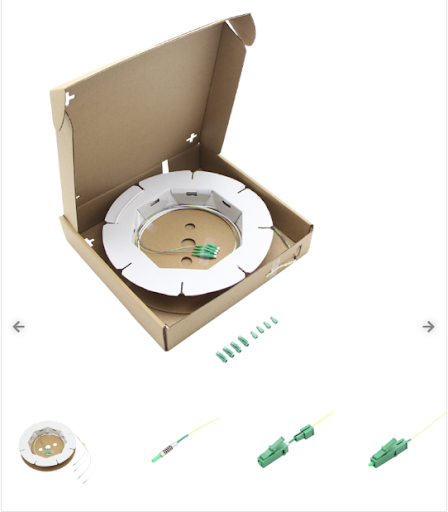

As internet usage continues to increase, households and businesses need faster and more reliable wireless connectivity throughout their buildings. Traditional home networking solutions can sometimes struggle to provide consistent coverage across multiple rooms, floors, and areas with thick walls. FTTR products offer a modern approach by extending fiber optic connectivity directly to different rooms and access points.
FTTR, or Fiber to the Room, uses optical fiber inside a building to create a high-speed network infrastructure. It can provide more consistent connectivity than relying on a single Wi-Fi router positioned in one location. Understanding the main FTTR components, their applications, and their benefits can help users determine whether this technology is suitable for their networking needs.
What Is FTTR?
FTTR stands for Fiber to the Room. It is a network architecture in which optical fiber is extended from a central network device to individual rooms or designated areas within a building.
Instead of depending entirely on wireless signals traveling from one central router, FTTR uses fiber connections to bring network capacity closer to each location where users need it.
An FTTR installation typically combines optical fiber, a central gateway or optical networking device, and multiple room-level access points. These components work together to create a distributed network throughout the property.
Main FTTR Products
An FTTR system can include several different products, depending on the installation and network requirements.
Optical Network Gateway
The central gateway connects the building’s internet service to the internal FTTR network. It manages communication between the incoming connection and the connected rooms.
The gateway may also provide routing, network management, and other functions depending on the model.
Optical Fiber
Fiber optic cable forms the backbone of an FTTR installation. It carries data using light and can support high bandwidth over the required distance.
The cable needs to be suitable for indoor installation and should be installed carefully to avoid excessive bending or physical damage.
Room Access Points
Room-level optical or Wi-Fi access points distribute the network connection in individual rooms or areas.
These devices allow smartphones, laptops, smart TVs, tablets, and other wireless equipment to connect to the network without requiring every device to have a physical fiber connection.
Optical Splitters
Some FTTR architectures use optical splitters to distribute signals from a central point to multiple locations. The exact configuration depends on the network design and equipment being used.
How FTTR Works
The process begins when the internet connection reaches the main network gateway. The gateway communicates with the fiber network inside the building.
Optical fiber then carries data to different rooms or access points. Each room-level device provides network connectivity to local wireless devices.
Because the fiber connection is extended closer to users, wireless access points do not need to depend on a single central router to cover the entire building.
This architecture can help create more consistent coverage across larger homes, offices, hotels, and other multi-room environments.
Benefits of FTTR Products
One major benefit of FTTR is improved network coverage. Instead of placing one router in a central location and expecting its wireless signal to reach every area, multiple access points can be distributed throughout the building.
FTTR can also support high bandwidth. Fiber infrastructure provides a high-capacity connection between the central network and individual rooms.
Another benefit is network stability. A wired fiber backbone reduces the need to use wireless links between access points, which can help avoid some of the performance limitations associated with wireless backhaul.
FTTR for Large Homes
Large homes can have challenging Wi-Fi environments. Thick walls, multiple floors, and long distances can weaken wireless signals.
An FTTR system can place access points in different rooms or areas, providing users with a stronger local wireless connection.
This can be useful for households with multiple users who simultaneously stream video, attend online meetings, play games, use smart home devices, and perform other bandwidth-intensive activities.
FTTR for Businesses
Businesses can also use FTTR products to create connectivity throughout offices, meeting rooms, reception areas, and other workspaces.
A distributed network can help employees access online applications, cloud services, video conferencing platforms, and internal systems.
Hotels, guesthouses, educational facilities, and other multi-room buildings may also consider FTTR when consistent connectivity is required across many areas.
FTTR and Wi-Fi
FTTR does not replace Wi-Fi completely. Instead, it can provide a fiber-based infrastructure that supports multiple wireless access points.
Users still connect their smartphones, laptops, and other devices through Wi-Fi. The difference is that each access point can have a high-speed fiber connection back to the central network.
This combination can provide a more structured approach to whole-building wireless coverage.
Factors to Consider When Choosing FTTR Products
Before purchasing FTTR equipment, buyers should consider the size and layout of the building. The number of rooms, floors, walls, and required access points can influence the system design.
Network speed is another consideration. Choose equipment that supports the desired bandwidth and is compatible with the internet service and other network components.
Compatibility between the gateway, fiber, access points, splitters, and management software is also important.
Installation requirements should be considered as well. Fiber cables need to be routed carefully, and professional installation may be appropriate for larger or more complex projects.
Managing an FTTR Network
Modern FTTR systems may provide centralized management tools. These can allow administrators to monitor connected devices, configure access points, manage network settings, and identify potential problems.
Centralized management can be particularly useful in commercial environments where multiple access points need to operate as part of one network.
Some systems may also support features such as automatic device roaming, allowing users to move between rooms while maintaining a wireless connection.
Future of FTTR Technology
As homes and businesses continue adopting cloud services, smart devices, high-resolution streaming, and other bandwidth-intensive applications, internal network infrastructure will become increasingly important.
FTTR provides a way to combine the capacity of optical fiber with the convenience of Wi-Fi. Future FTTR products may offer faster interfaces, improved management systems, better wireless standards, and more compact installation designs.
Conclusion
FTTR products provide a practical approach to extending high-speed fiber connectivity throughout multi-room buildings. By combining optical fiber, central gateways, room-level access points, and other networking components, FTTR can create a structured foundation for reliable whole-building connectivity.
The technology can be useful for large homes, offices, hotels, educational facilities, and other environments where traditional single-router Wi-Fi may not provide sufficient coverage.
When selecting FTTR equipment, buyers should consider network speed, building size, number of rooms, equipment compatibility, installation requirements, and management features. With appropriate planning and installation, FTTR can provide a scalable network infrastructure designed to support modern connectivity demands.